Before you start.
Polias is not released yet. These pages describe the current unreleased 0.1.0 build, so file names and menu labels may still move. Join the waitlist and we will write when there is something to install.
Polias runs coding agents side by side. It supports Claude Code, Codex, Gemini CLI, OpenCode and Aider, carries its own agent called polias-agent, and also opens plain shells. Polias does not install these tools. It finds the ones already on your PATH. Gemini CLI and OpenCode support was written from their documentation and has not yet been checked against a running install.
Install.
There is one desktop bundle per operating system. Each carries three programs besides the app: poliasd (the daemon, which owns every terminal, agent and setting), polias (the command line client) and polias-agent (the built-in agent). The app starts the daemon when it is not running.
On Linux.
Builds are for x86_64, on Ubuntu 22.04 or a distribution of the same age or newer. Three formats are built.
- Debian, Ubuntu and derivatives:
sudo apt install ./Polias_<version>_amd64.deb. The package pulls inlibwebkit2gtk-4.1-0. - Fedora and other dnf-based distributions:
sudo dnf install ./Polias-<version>-1.x86_64.rpm. - Anything else: the AppImage. Run
chmod +x Polias_<version>_amd64.AppImage, then run it. It needs WebKitGTK 4.1 from your distribution.
On macOS.
Open Polias_<version>_universal.dmg and drag Polias to Applications. One bundle covers Apple silicon and Intel Macs, on macOS 11 or newer.
On Windows.
Windows 10 or 11, x64. Run Polias_<version>_x64-setup.exe for a per-user install with no administrator needed, or the .msi for managed machines. If the WebView2 runtime is missing, the installer downloads it. Agents run natively under ConPTY, so WSL is not required.
Check what you downloaded.
Each release lists a SHA256SUMS-<platform>.txt file. Compare it with the file you downloaded before you install.
$ sha256sum Polias_0.1.0_amd64.deb
$ shasum -a 256 Polias_0.1.0_universal.dmg
PS> Get-FileHash Polias_0.1.0_x64-setup.exe
First run.
- Polias starts
poliasdin the background. Closing the window leaves the daemon and its agents running, and opening Polias again reconnects to them. - On the first launch the daemon creates your owner account. There is no password while the daemon only listens on this machine.
- Polias looks for Claude Code, Codex, Gemini CLI, OpenCode and Aider on your
PATH. Settings, Harnesses lists what it found and the command each one runs.
Updates are checked only when you press Check for updates in Settings, General. Polias never checks or downloads on its own.
Your first instance.
From the app.
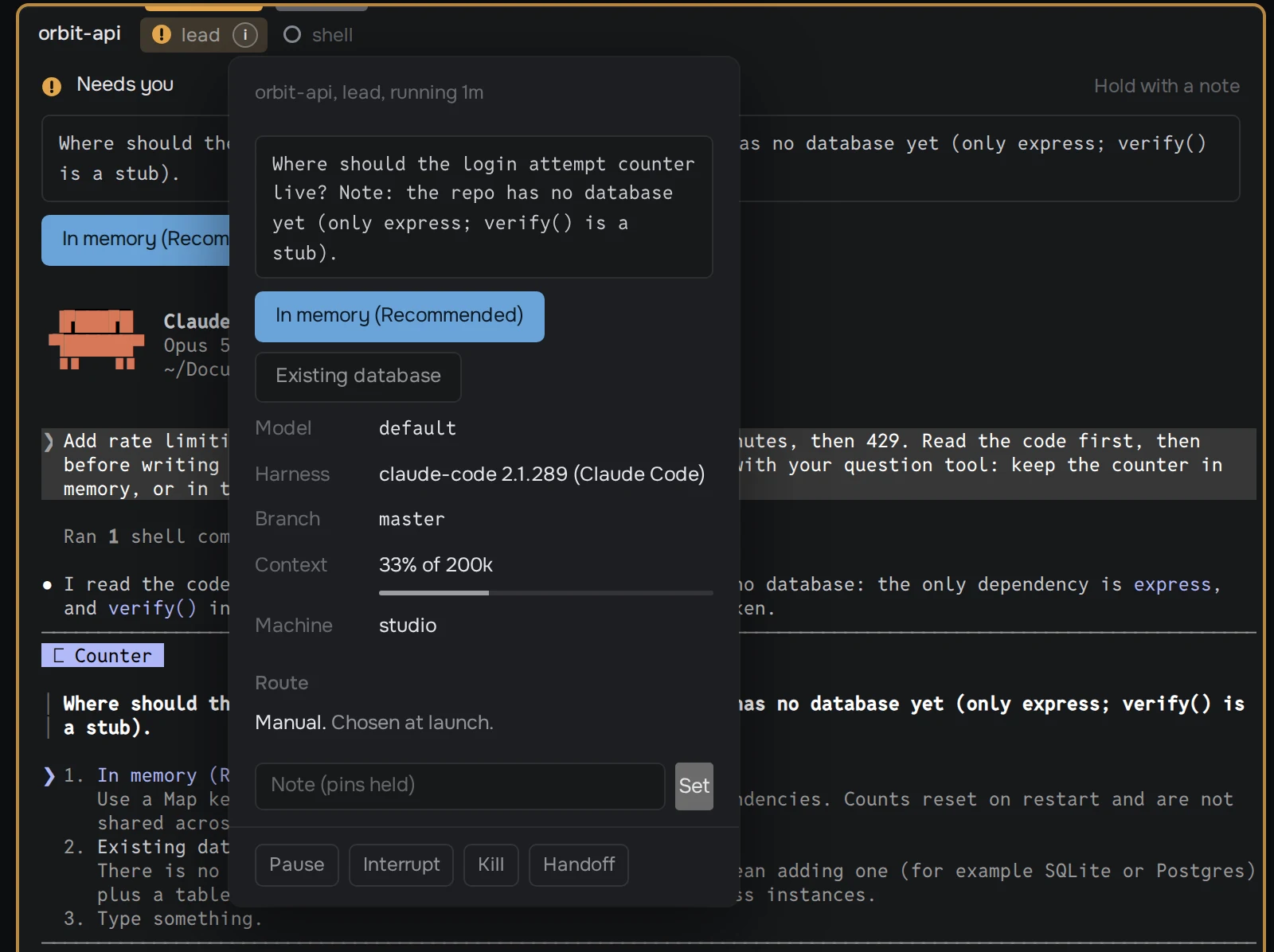
Press New instance or Ctrl+Shift+N, choose a folder and a harness, and the agent starts in a tile. Tiles are grouped by repository, with one tab per instance. The tab carries a state icon, a strip of the state colour and the name. A tile that needs an answer from you turns amber, and the count of instances waiting on you shows in the top bar. Amber means needs you and nothing else.
The launcher remembers the last harness and account for each folder, the last 12 folders, and the last machine you chose. If you leave the harness to the router, your routing rules pick it.
From the command line.
The same launch is one command. Leave out --harness and routing picks one, then the default harness in Settings.
$ polias launch --help
Usage: polias launch [OPTIONS] <CWD>

Arguments:
  <CWD>

Options:
      --harness <HARNESS>  Omit to let the router pick (then the default harness in Settings)
      --name <NAME>
      --group <GROUP>
      --prompt <PROMPT>
      --tag <TAGS>         Task tag for the router, repeatable: --tag sweep --tag tests
  -h, --help               Print help
An <id> in any command can be a full id, a unique prefix, or a unique group/name.
Instance states.
Every state has its own icon, so the grid reads without colour: working is an open arc, needs you a filled circle with an exclamation mark, idle a ring, paused two bars, held a bookmark, limit a clock and dead a cross. An instance is held when it needs you and carries a note. Held instances are left out of the needs-you count.
Answering agents.
When an agent asks for permission or puts a question to you, you can answer it in three places. Each answer is bound to the prompt it replies to. If the agent has moved on, Polias tells you it is asking something else and sends nothing stale.
In the tile.
The prompt shows its options in the harness's own order. Claude Code offers Yes, Yes, and don't ask again this session and No. Codex offers Yes, Yes, always for this command and No. polias-agent offers Allow once, Allow for this session and Deny. Deny is sent as the Esc key, so a deny can never type an approval. The Claude Code and Codex approval keystrokes are written for claude 2.1.285 and codex-cli 0.155.1 and have not yet been driven against a live prompt.
In the queue.
The needs-you queue sits under the count in the top bar. It lists waiting instances oldest first, then a Held group. You can answer from the queue without finding the tile.
On your phone.
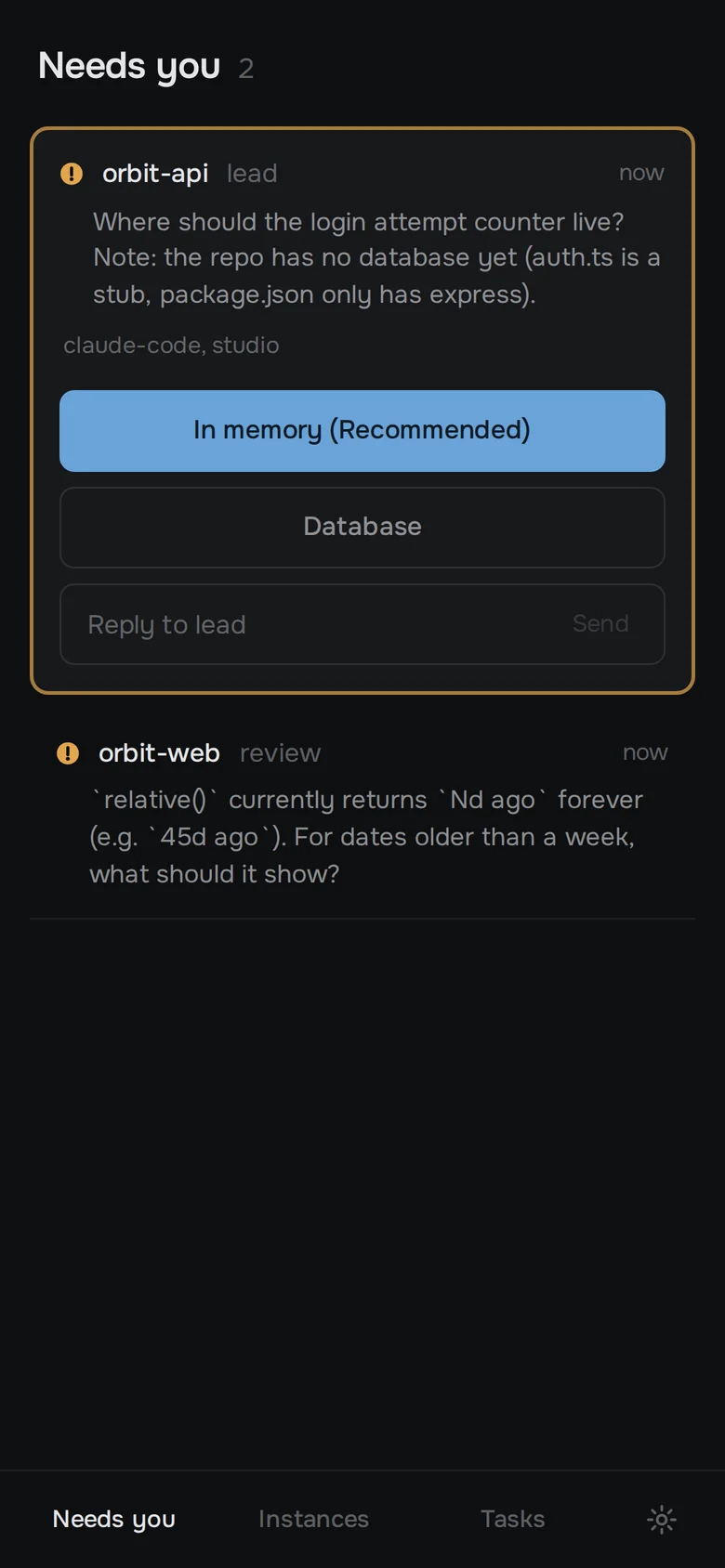
The phone app shows the same queue across every desktop you have paired. Approve picks the agent's first option and Deny its deny option. You can also type a reply to any waiting instance. See Pairing a phone.
What cannot be answered from Polias.
- OpenCode approvals. Give them in the terminal.
- Prompts from Gemini CLI, Aider and shell instances. You can still type a reply.
- A Claude Code multi-select question, and any question after the first in a set.
Providers and keys.
A provider is somewhere models are served from. Open Settings, Models and routing, which has four tabs: Providers, Rules, Usage and Preview.
| Provider | What you give Polias |
|---|---|
| Anthropic | API key |
| OpenAI | API key |
| API key | |
| OpenRouter | API key |
| OpenAI-compatible | Base URL, key optional. Covers Ollama, vLLM, LM Studio and llama.cpp. |
On the Providers tab press Add provider, choose the kind, paste the key and save. The key goes straight into your system keychain: Keychain on macOS, Credential Manager on Windows, the Secret Service on Linux. It is never written to Polias's database, a config file or a log, and no method returns it. An agent never sees it. Each instance gets its own gateway token instead.
A provider whose host is localhost, a loopback or private network address, or ends in .local is marked Local.
Subscription logins, such as a Claude or ChatGPT plan, are not proxied. Those tools keep their own sign-in, and routing chooses which account (which config folder) the instance starts with. Only instances routed to a provider you added use Polias's local gateway. Gemini CLI and shell instances are not routed through it.
Routing rules.
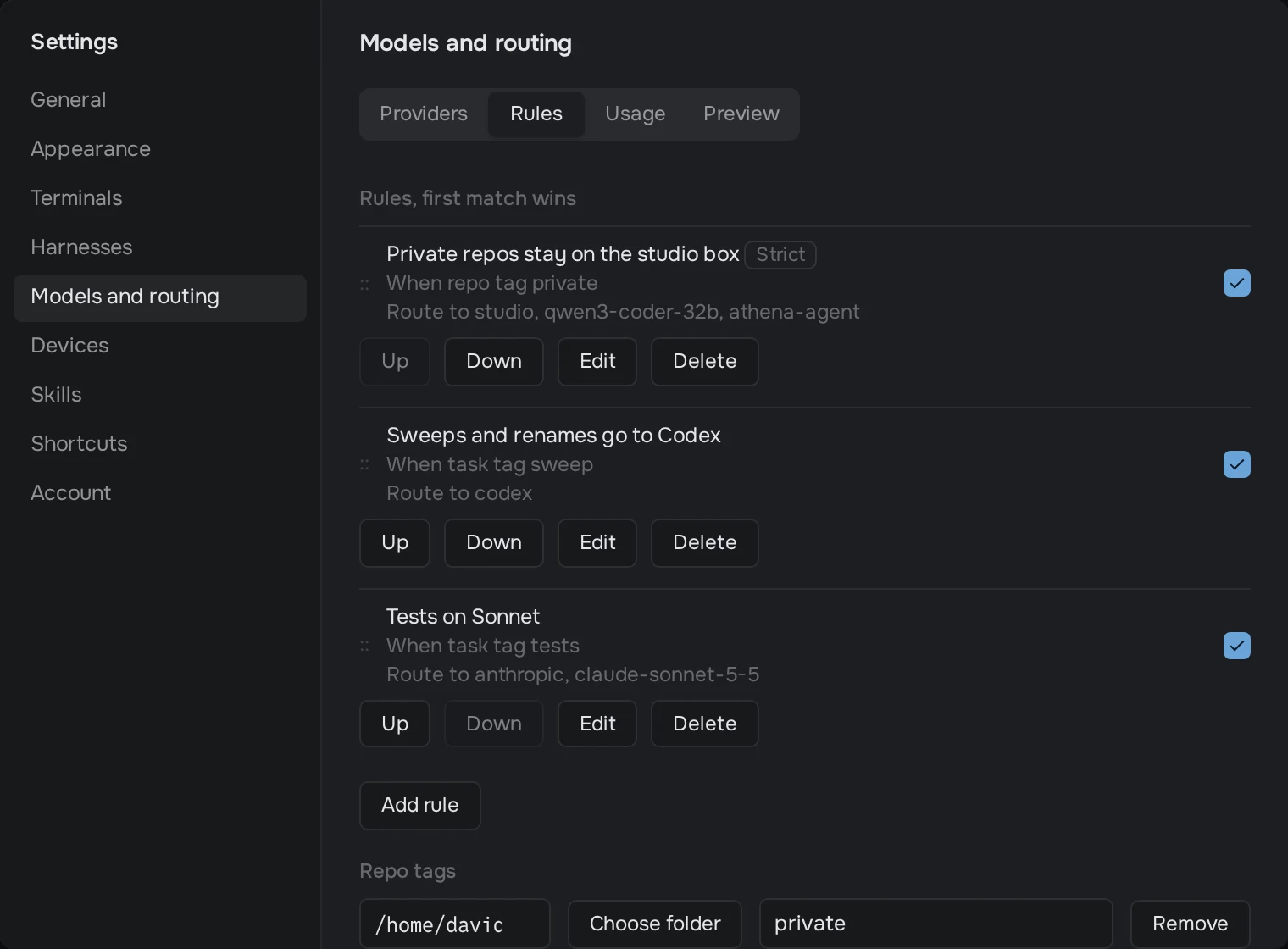
Rules are checked top to bottom and the first enabled match wins. A choice you make when launching always overrides them.
What a rule matches.
A rule can match on repository tags, task tags, harness and repository (a root path or a name). Every list you fill in must match.
- Repository tags: tag a repository path, for example
private, under Repo tags. - Task tags: given at launch with
polias launch --tag, in the task form, or by an agent spawning a helper.
Where a rule sends the work.
A rule routes to any of a harness, a provider and model, or an account. For example:
- Repositories tagged
privatego to a local Ollama model, marked strict. - Tasks tagged
sweepgo to Codex.
athena-agent, which the app now shows as polias-agent.Strict rules.
A strict rule is enforced in the gateway. An instance under it can never reach a provider outside the rule's set, even through a fallback. The gateway answers 403 and opens no upstream connection. A model you pick by hand outside the set is refused, and children inherit their parent's set. Strict keeps traffic inside the providers the rule names. It means local only when the rule names a local provider.
Fallback routes.
Fallback steps are tried in order. There are two triggers: an account hitting its usage limit, and a provider being down (a connect error, a timeout or a 5xx before the first byte). A provider-down fallback retries once on the next step. A usage-limit fallback is applied automatically when the step changes only the account. A transient HTTP 429 is never treated as a usage limit.
Preview a route.
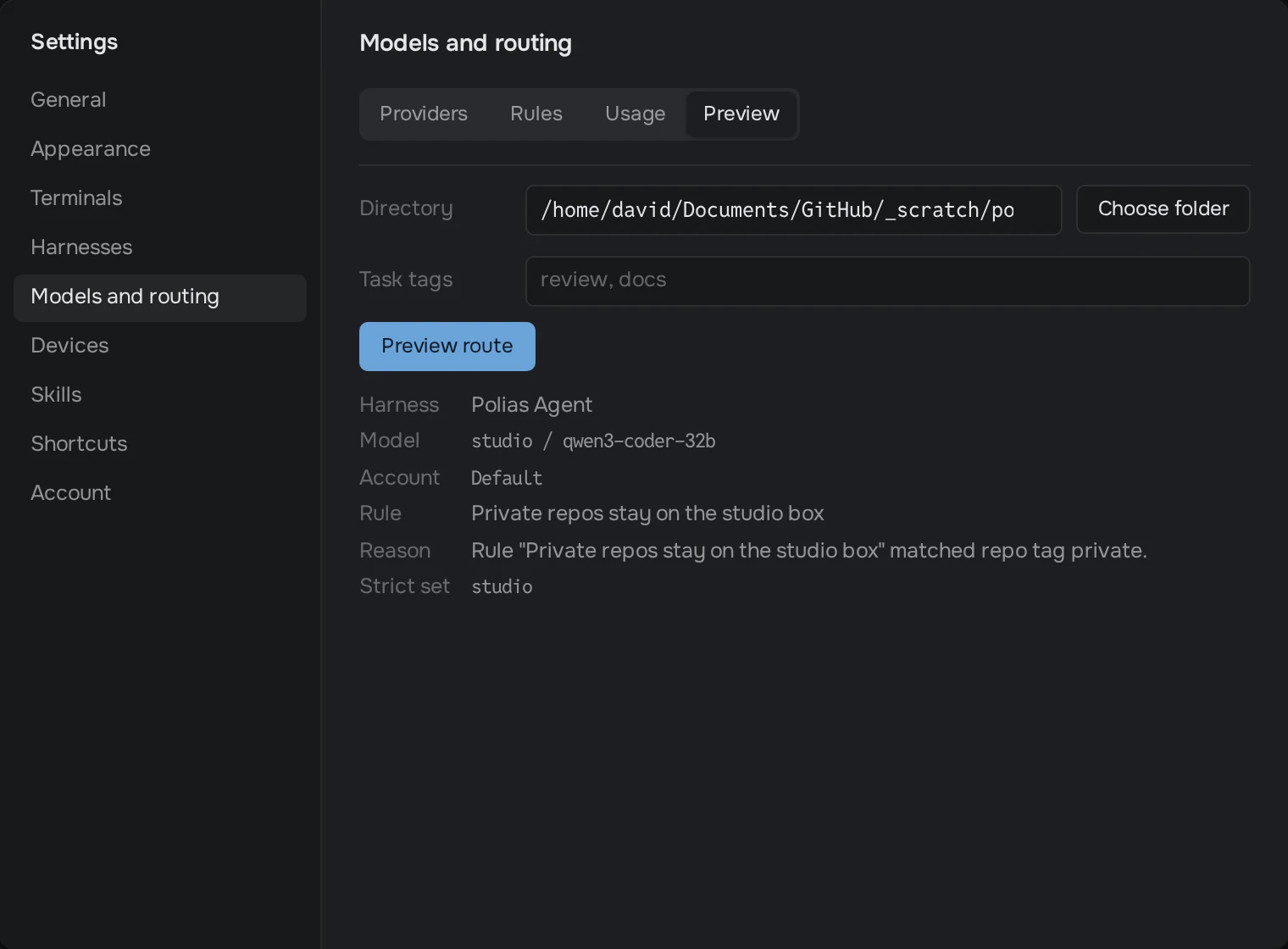
The Preview tab shows the harness, model, account, rule, reason and strict set for a folder and tags before you launch. It has no side effect. Every instance also records which rule placed it and why.
Spending budgets.
A budget caps spend in euro for a user (there is one local user today), a group or one instance, per day, week or month. Once spent, the gateway answers 429 without calling the provider. Usage is counted from the token counts the provider reports, never estimated. Enter per-model euro prices on the provider to get costs; unpriced requests are counted separately. The Usage tab shows spend over the last 24 hours, 7 days or 30 days, and where each budget stands.
The task board.
A task is work given to one agent in its own git worktree. Nothing reaches your checkout until you press Apply. Tasks run on this computer's daemon and are not passed to paired computers. Open the board from the command palette (Ctrl+K) with Show task board.
Create a task.
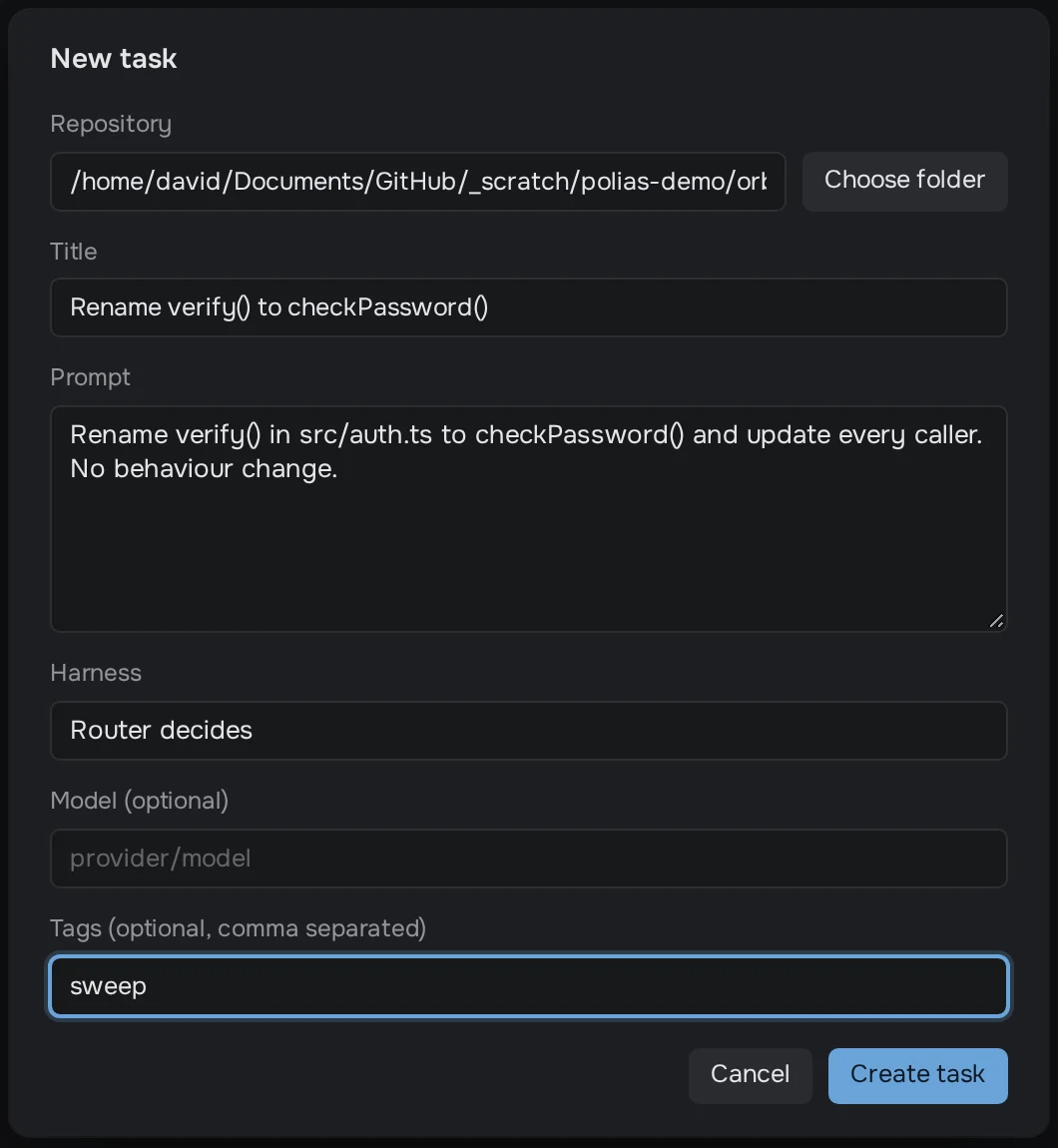
Press New task and fill in Repository, Title (one line, up to 120 characters), Prompt, Harness (Router decides, or a detected harness) and Tags, separated by commas. Polias creates a branch named polias/task-<slug>-<id> from the current commit and a worktree under worktrees/ in your data folder. The task's instance appears in the repository's tile like any other.
Task statuses.
A task is Queued, Running, Review, Done, Discarded or Failed.
Checkpoints, diffs and roll back.
A checkpoint is recorded each time the agent finishes a turn with changes. Checkpoints are commits on hidden refs and never move your branch or files. The diff shows the changes since a checkpoint or all changes since the task started, with a file list (A, M or D, and line counts) and the patch. Patches over 512 KiB and binary files show "Binary file, or too large to show here".
Roll back returns the worktree's files to a checkpoint after asking. It saves the current state as a checkpoint first, so a rollback can be undone. Ignored files such as node_modules are left alone.
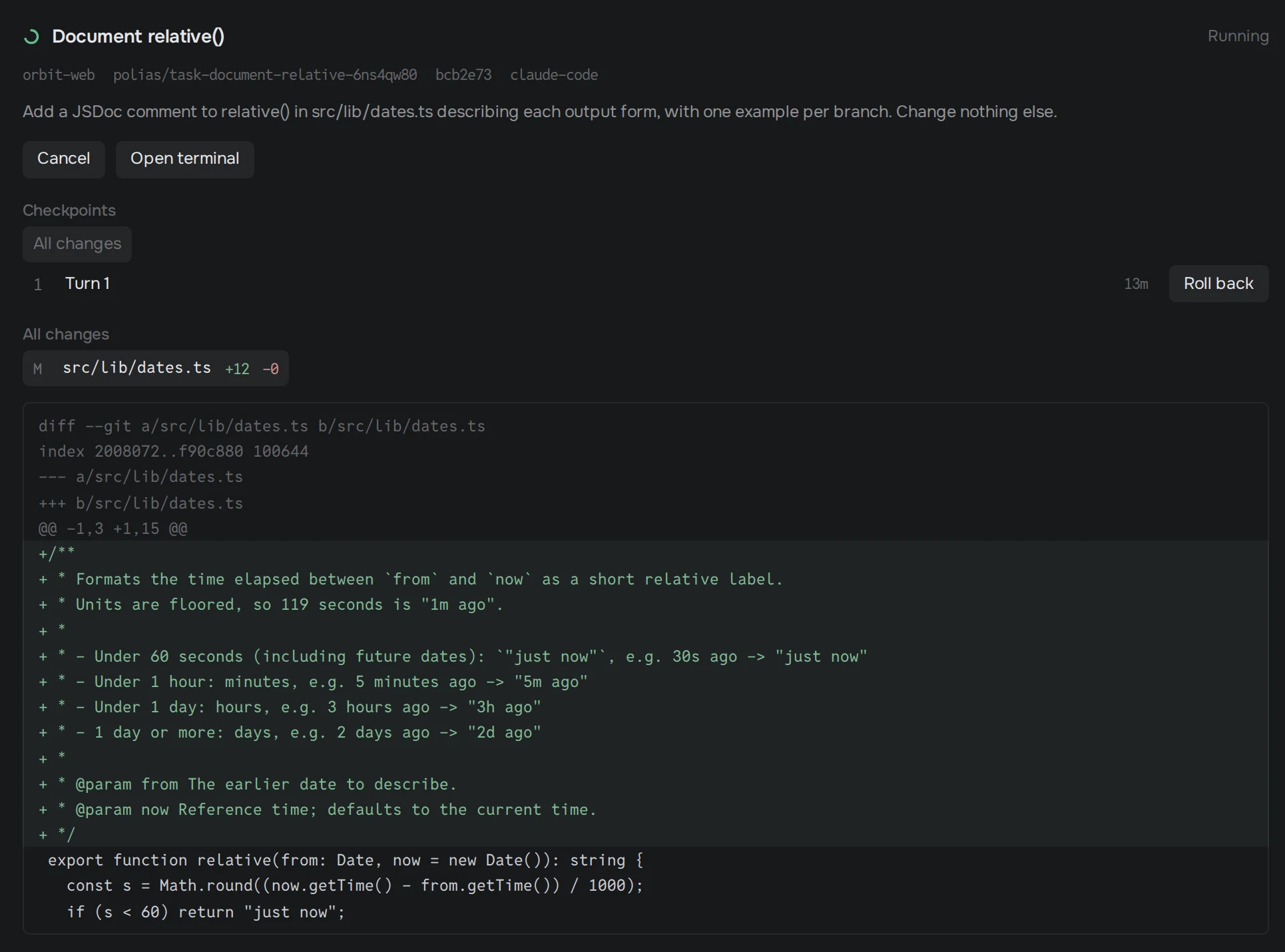
Commit, apply, discard, cancel.
- Commit commits on the task branch with your own git identity.
- Apply fast-forwards your branch. It is refused when the task has changes after its commit, your checkout is on a detached HEAD or has uncommitted changes, or the branch has moved on. After Apply the agent is stopped and the worktree, branch and checkpoint refs are removed.
- Discard stops the agent and removes the worktree, branch and refs. Your own checkout is never touched.
- Cancel stops the agent. With changes the task goes to Review, otherwise it is discarded.
Apply only fast-forwards. There is no rebase.
Pairing a phone.
The phone app runs on Android 8.0 or newer and iOS 15 or newer. It talks to each desktop's daemon directly over Polias's encrypted device mesh, from anywhere. A phone pairs with each desktop separately, so pair it with every computer whose agents you want to see.
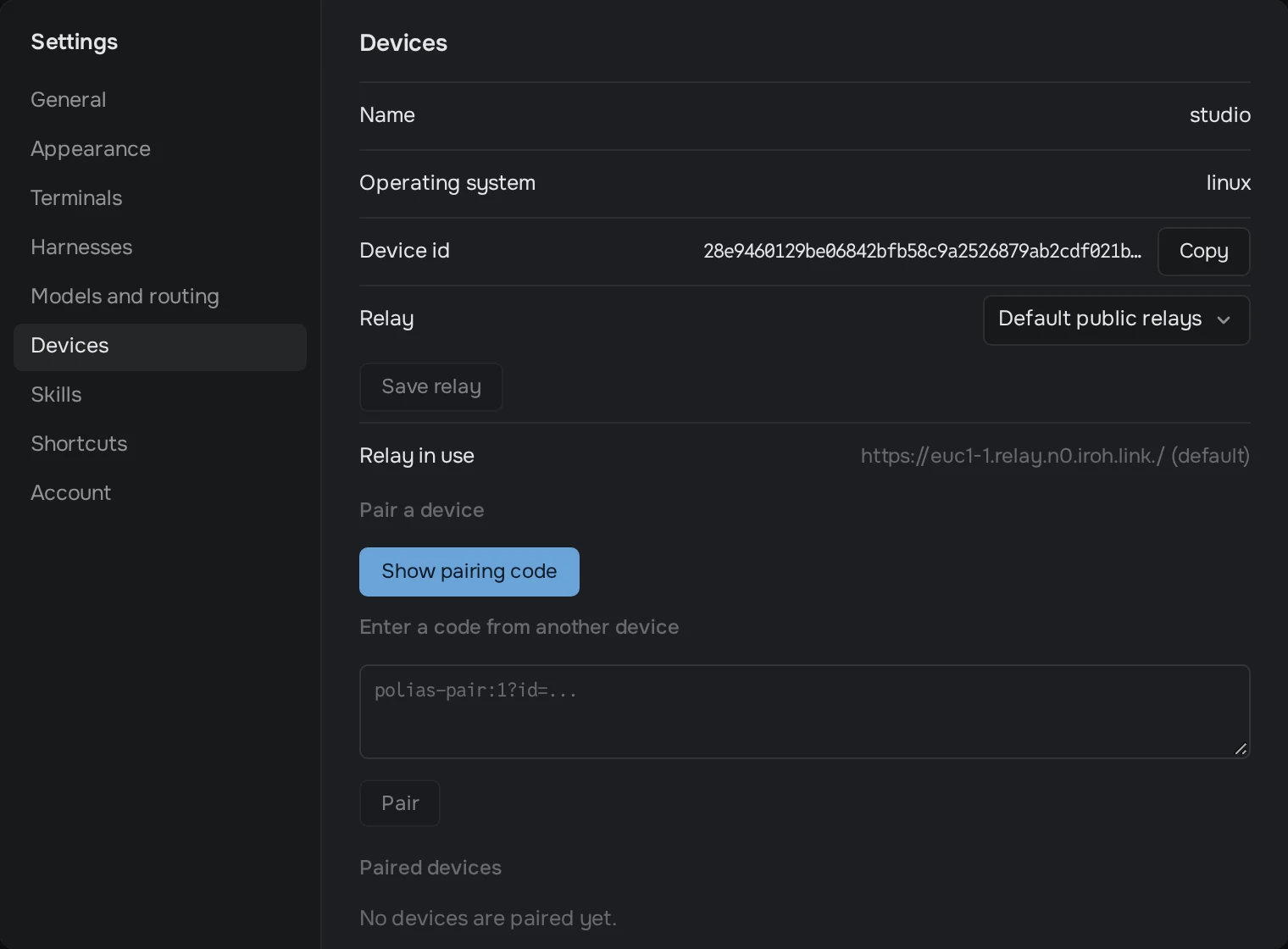
- On the desktop, open Settings, Devices. Under Pair a device press Show pairing code. A QR code appears, with the pairing text underneath and a countdown.
- On the phone, press Scan and point the camera at the QR code, or paste the text into the field.
- The desktop appears in the phone's list. Repeat for each computer.
A code works once, for five minutes, and five wrong attempts cancel it. The phone declares itself a phone when it pairs, and that is fixed for as long as the pairing lasts.
The screens.
- Needs you: every waiting instance from every paired desktop, oldest first, with the first one open.
- Instances: everything running, grouped by computer and repository. The terminal is view only; type through the reply field.
- Tasks: the task board with diffs, read only unless you grant
lifecycle. - Settings: your paired desktops and whether each is reachable.
What a phone may do.
By default a phone can read instances, tasks and diffs, follow changes, watch terminals, answer a waiting instance, send it text and register for push. The desktop owner can give more, as checkboxes per phone in Settings, Devices. They apply on the phone's next request.
launch: start, restore, adopt, broadcast, hand off and create tasks.lifecycle: kill, pause, resume, interrupt, note, rename, forget and move; cancel, commit, apply, discard and roll back tasks.full: everything, including typing into a terminal.
Each desktop checks every phone request against its scope and records refusals in its audit log. If you lose a phone, remove it in Settings, Devices on each desktop and its key stops working there.
Push notifications.
A push carries only the instance name and the words needs you. It never carries the question, a command, a path, a diff or code. Firebase on Android and Apple on iOS therefore see instance names. Push needs a small push service, which is not deployed yet. Without push the phone still shows what needs you when you open it.
The command line.
The polias command controls instances on this machine. polias --help prints this.
$ polias --help
Control local Polias instances

Usage: polias <COMMAND>

Commands:
  ls         List every instance: state, group, name, harness and id
  launch     Start an agent in a directory
  send       Type text into an instance, then Enter
  interrupt  Interrupt what an instance is doing (its harness's own interrupt key)
  kill       Stop an instance's process; its session stays restorable
  restore    Start an ended instance again on its saved session
  pause      Freeze an idle or waiting instance; a working one is never paused
  resume     Unfreeze a paused instance
  note       Hold an instance with a note, or clear the note when TEXT is omitted
  attach     Open an instance's terminal in this one (detach with Ctrl+])
  report     What every instance did over the last N hours
  daemon     Print the running daemon's address and pid
  help       Print this message or the help of the given subcommand(s)

Options:
  -h, --help  Print help
| Command | What it does |
|---|---|
ls | List every instance: state, group, name, harness and id |
launch | Start an agent in a directory |
send | Type text into an instance, then Enter |
interrupt | Interrupt what an instance is doing (its harness's own interrupt key) |
kill | Stop an instance's process; its session stays restorable |
restore | Start an ended instance again on its saved session |
pause | Freeze an idle or waiting instance; a working one is never paused |
resume | Unfreeze a paused instance |
note | Hold an instance with a note, or clear the note when TEXT is omitted |
attach | Open an instance's terminal in this one (detach with Ctrl+]) |
report | What every instance did over the last N hours |
daemon | Print the running daemon's address and pid |
help | Print this message or the help of the given subcommand(s) |
ls also takes --json. send takes --no-submit to skip the Enter. report defaults to the last 24 hours.
Where your data lives.
| System | Folder |
|---|---|
| Linux | ~/.local/share/polias |
| macOS | ~/Library/Application Support/polias |
| Windows | Under %LOCALAPPDATA%\polias |
Inside it you will find:
athena.db: instances, notes, tasks, settings and the audit log.daemon.json, which tells clients how to find the daemon, andtoken, the daemon's access token, readable by your user only.logs/, withpoliasd.logrotated at 5 MiB, keeping two old files.run/for per-instance generated config, andbackups/for copies of files Polias changed, so an uninstall can restore them.worktrees/for task board checkouts.
API keys are not in that folder. They are in your system keychain. Set POLIAS_HOME to use a different folder, for example to run a second daemon for testing.
When you uninstall, your data folder stays. Delete it by hand to remove everything. Settings, Harnesses can first remove the hooks Polias installed into each agent tool, restoring the original files from backups/. Polias shows a diff before it changes any of your files, and backs up each one.
Getting help.
Write to hello@mtmn.ie. Tell us your operating system and the harness you were using, and we will reply from there.